-
Hard Plug Loopback Tests for E1 Lines
The hardware loopback plug test is used to see if the router has any faults. If a router passes a hardware loopback plug test, then the problem exists elsewhere on the line.
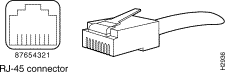
Creating the Loopback Plug for E1 on RJ-45
Complete the following steps to create a loopback plug for E1:-
Use wire cutters to cut a working cable that is 5 inches long with a connector attached.
-
Strip the wires.
-
Twist the wires from pins 1 and 4 together.
-
Twist the wires from pins 2 and 5 together.
-
Leave the other wires alone
Creating the Loopback Plug for E1 on DB-15
Complete the following steps to create a loopback plug for E1 on DB-15:
-
Use wire cutters to cut a working DB-15 cable that is 5 inches long with a connector attached.
-
Strip the wires.
-
Twist the wires from pins 2 and 15 together.
-
Twist the wires from pins 9 and 8 together.
-
Leave the other wires alone.
-

Subscribe to:
Post Comments (Atom)


0 comments: